

What's New
Product updates and announcements
Loading updates...
Product updates and announcements
The Pyramid Strategy Calculator is a powerful tool designed to help traders build, test, and analyze pyramiding positions with precision. Instead of guessing position sizes or trying to calculate risk manually, this calculator automatically evaluates each step, adjusts risk, unifies stop-loss levels, and gives you a clear breakdown of position size, average entry, and cumulative profit or risk. Whether you’re trading forex, stocks, crypto, gold, or oil, this tool ensures your pyramiding strategy stays structured, safe, and data-driven.
The Pyramid Money Management Calculator is a strategic tool designed to help traders manage and analyze pyramiding positions—adding multiple layers to a profitable trade while adjusting risk, position size, and unified stop loss. By clearly showing how each additional step affects total exposure, average entry, locked-in profit, or total risk, this calculator empowers traders to make informed decisions, preserve capital, and maximize trade potential. It promotes disciplined trade scaling rather than emotional decision-making, making it ideal for swing traders, position traders, and trend-followers.
The Pyramid Strategy Calculator lets you stack additional positions on top of an existing trade (pyramiding) and helps evaluate position sizing, overall risk, and profitability at each stage. As you build your strategy, it gives real-time visibility into how your unified stop loss influences locked-in gains or potential loss, making it easy to adjust and optimize before executing trades.
Negative values represent total risk exposure if price hits the stop loss. Positive values indicate locked-in profit—your worst-case result is still profitable.
This foundational step determines how much you’re risking on the initial trade, setting the tone for all subsequent pyramiding layers. Accurate account and risk settings ensure realistic position sizing.
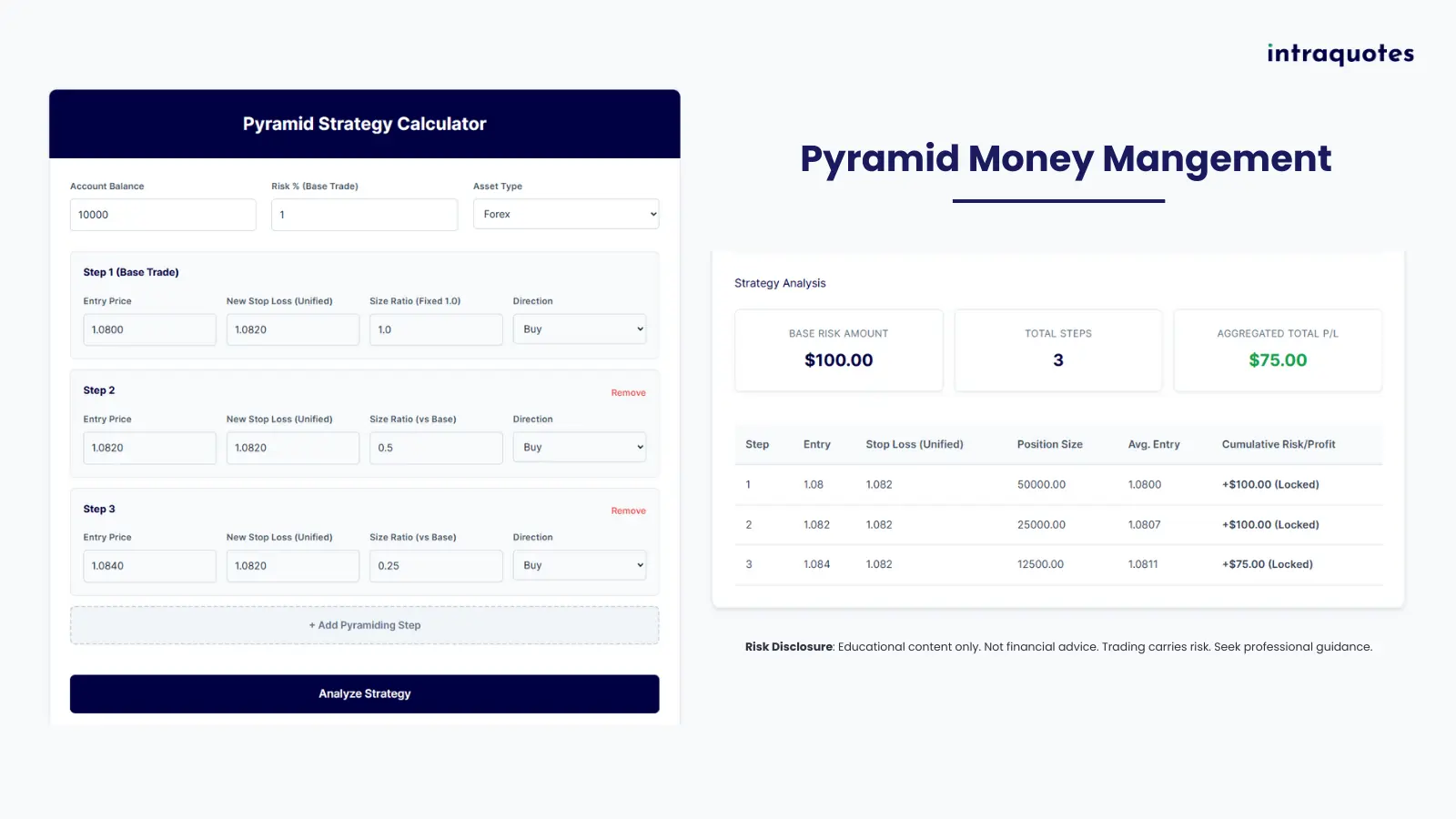
Enter your total account size (e.g. $10,000). This has a direct impact on the base risk amount.
The percentage of your account you’re willing to risk on the first trade (e.g. 1%).
Base Risk Amount = account balance × risk %.
Select Forex, Stocks, Crypto, Gold, or Oil. This only pre-fills example trade values.
Each “Step” represents a new trade layer entered as the position moves in profit. The calculator assumes a shared stop loss at each stage, creating a unified exit level for all active trades. This approach is essential for securing profits while scaling.
Where this step’s position is opened. For Step 1, this is your initial trade.
The shared stop loss applied to all open trades after this step is activated.
The calculator estimates total P&L if this unified stop gets hit.
Controls how big each new position is relative to the base trade size:
Set trade type: Buy (Long) or Sell (Short).
Direction affects whether stop loss results in profit or loss.
Adding & removing steps
After reviewing all inputs, click Analyze Strategy to calculate your position sizes, average entry, cumulative P/L for each step, and aggregated total P/L.
If something is incomplete or invalid, the calculator will prompt you to correct it.
The total amount risked on the initial position. All other steps scale from this foundation.
Shows how many layers have been added to your strategy, including the base trade.
The final cumulative profit or loss across all trades at the last step. It reflects total locked-in profit or maximum risk exposure if current shared stop loss is triggered.
If you want to explore the Pyramid Trading Strategy in more depth – including detailed examples, risk structures, trade execution timing, and step-by-step pyramiding models – visit the comprehensive guide below:
🔗 Pyramid Trading Strategy – Complete GuideImportant notice
This calculator is intended for planning and educational purposes. It does not place trades or guarantee financial outcomes. Always use proper risk management and consider consulting a financial professional.
Product updates and announcements