Table of Contents
IQ FX Correlation Matrix is a professional multi-timeframe correlation dashboard designed to help traders analyze real-time relationships between multiple currency pairs and other assets. The indicator allows traders to instantly identify strong positive and negative correlations across up to 28 symbols, improving trade accuracy, risk control, and portfolio diversification.
This tool is intended as a confirmation and analysis aid. It helps traders validate trade ideas alongside trend analysis, price action, and key support and resistance levels.
Why IQ FX Correlation Matrix useful?
The indicator provides a clear overview of how different instruments move in relation to each other. By understanding correlations, traders can:
- Improve trade accuracy by identifying strong and weak relationships between symbols
- Avoid overexposure to highly correlated pairs
- Identify hedging and diversification opportunities
- Find high-probability setups using correlation confirmation
Who is this indicator for?
IQ FX Correlation Matrix is suitable for:
- Scalpers
- Intraday traders
- Swing traders
It is designed for traders who already understand basic forex correlation concepts and want a reliable dashboard to confirm trade decisions and reduce unnecessary risk.
This indicator should not be used as a standalone trading system.
Supported Symbols
The indicator works with a wide range of instruments, including:
- Forex major and minor pairs
- Metals
- Indices
- Cryptocurrencies
It functions across all supported symbols available in the MetaTrader Market Watch.
Symbol and Dashboard Limits
- The indicator supports up to 2 dashboards on 2 charts simultaneously
- Each dashboard can display up to 28 symbols
- Total monitoring capacity is up to 56 symbols at the same time
For best performance, it is recommended to run the indicator on a separate chart.
Supported Timeframes
IQ FX Correlation Matrix works across all standard MetaTrader timeframes:
- 1 Minute
- 5 Minutes
- 15 Minutes
- 30 Minutes
- 1 Hour
- 4 Hours
- 1 Day
- 1 Week
- 1 Month
Backtesting Notes
During Strategy Tester backtesting:
- Only one symbol will be displayed
- Custom symbols and full 28-symbol correlation data are not supported
This limitation is due to MetaTrader platform restrictions.
How to install and get started?
- Purchase the indicator from the MQL5 Market
- Open MetaTrader and log in to your account
- Go to Toolbox or Terminal, then open Market and select Purchased
- Install IQ FX Correlation Matrix
- Open Navigator, locate the indicator under Market
- Drag and drop it onto a chart
Once loaded, the dashboard will automatically display correlations based on Market Watch symbols.
How IQ FX Correlation Works?
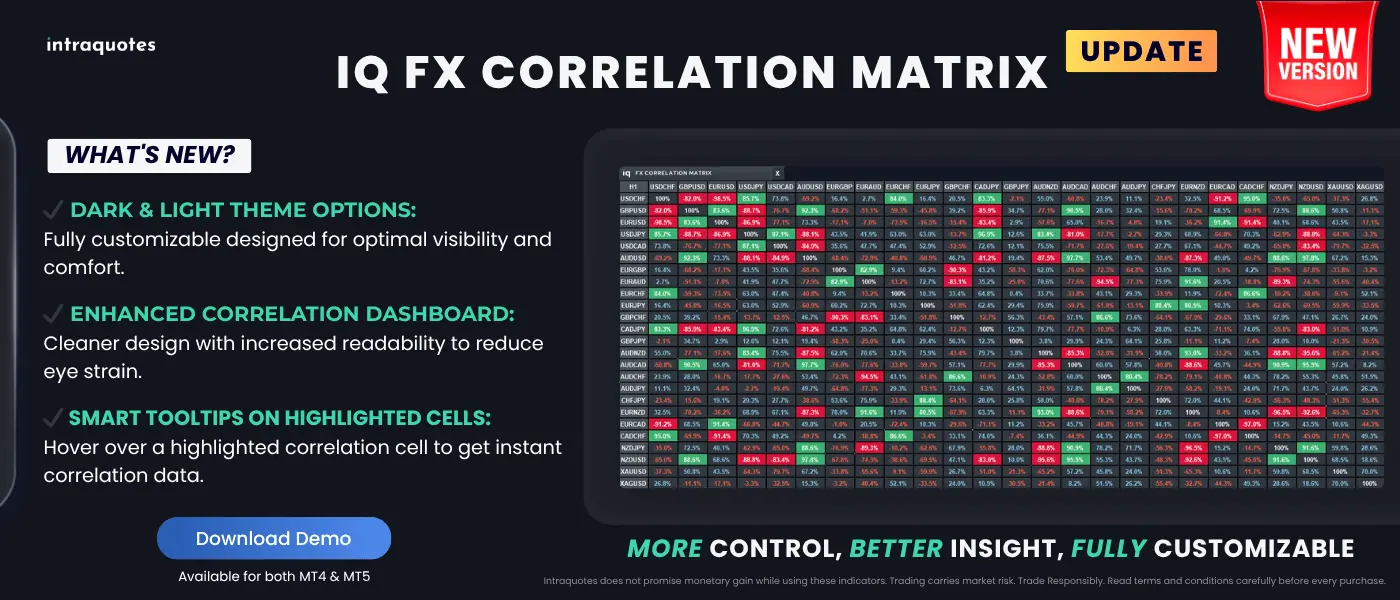
The indicator continuously monitors price movement relationships between multiple symbols and calculates correlation values in percentage form.
Key behaviour:
- Positive correlation is highlighted in green
- Negative correlation is highlighted in red
- Stronger correlations appear more prominently
- Weaker correlations remain neutral
This allows traders to instantly identify whether instruments are moving together or in opposite directions.
Understanding Correlation Values

Positive Correlation:
- Both symbols move in the same direction
- Suitable for trend-following and basket trading

Negative Correlation:
- Symbols move in opposite directions
- Useful for hedging and divergence-based strategies

Correlation strength guidelines:
- Less than 50 percent: Not reliable
- 50 to 60 percent: Tradable but weak
- 60 to 90 percent: Strong and tradable
- Above 90 percent: Very strong correlation
Indicator Features in Details
- Multi-timeframe, multi-currency correlation dashboard
- Real-time correlation percentage values
- Automatic dashboard resizing based on available symbols
- Manual or automatic symbol selection
- Dark and light theme support
- Fully customizable colors for correlation strength, text, and background
- Smart tooltips showing exact symbol pair and correlation value
- Adaptable dashboard sizes for SD, HD, Full HD, and 4K monitors
- 5 PC activation for use across multiple brokers and systems
Indicator User Input Settings

Manual Symbol Selection:
Allows manual entry of preferred symbols or automatic selection from Market Watch.
Custom Timeframes:
Choose specific timeframes for correlation calculation.
Correlation Percentage Filter:
Set minimum correlation strength, typically between 50 percent and 90 percent.
Symbol Rearrangement:
Reorder symbols by rearranging Market Watch positions.
Highlight Color Settings:
Customize positive, negative, and neutral correlation colors.
Note: This indicator does not provide buffer output for EA integration.
Trading Strategy Guidance
- Using Positive Correlation:
When two symbols show strong positive correlation, trades in the same direction may reinforce overall exposure. - Using Negative Correlation:
When symbols show strong negative correlation, traders can hedge positions by trading opposite directions. - Risk Reduction:
Avoid opening multiple positions on highly correlated pairs unknowingly. - Divergence Opportunities:
When correlated pairs temporarily diverge, the indicator can help identify potential reversion opportunities.
Using with Other Indicators
IQ FX Correlation Matrix works best as a confirmation tool. It can be combined with:
- Trend indicators
- Price action strategies
- Support and resistance tools
- Multi-timeframe trend dashboards
Correlation should always support your primary trade setup, not replace it.
Indicator Troubleshooting
- Symbol Order Issues:
Ensure frequently used symbols are placed at the top of Market Watch. Hide unused symbols for better performance. - Data Not Synchronizing:
Load all required symbols in Market Watch and allow time for historical data to sync. - Backtesting Freezes:
Download full historical data from History Center and ensure a stable internet connection.
Download Indicator
IQ FX Correlation Indicator – View Details